
The desktop at home
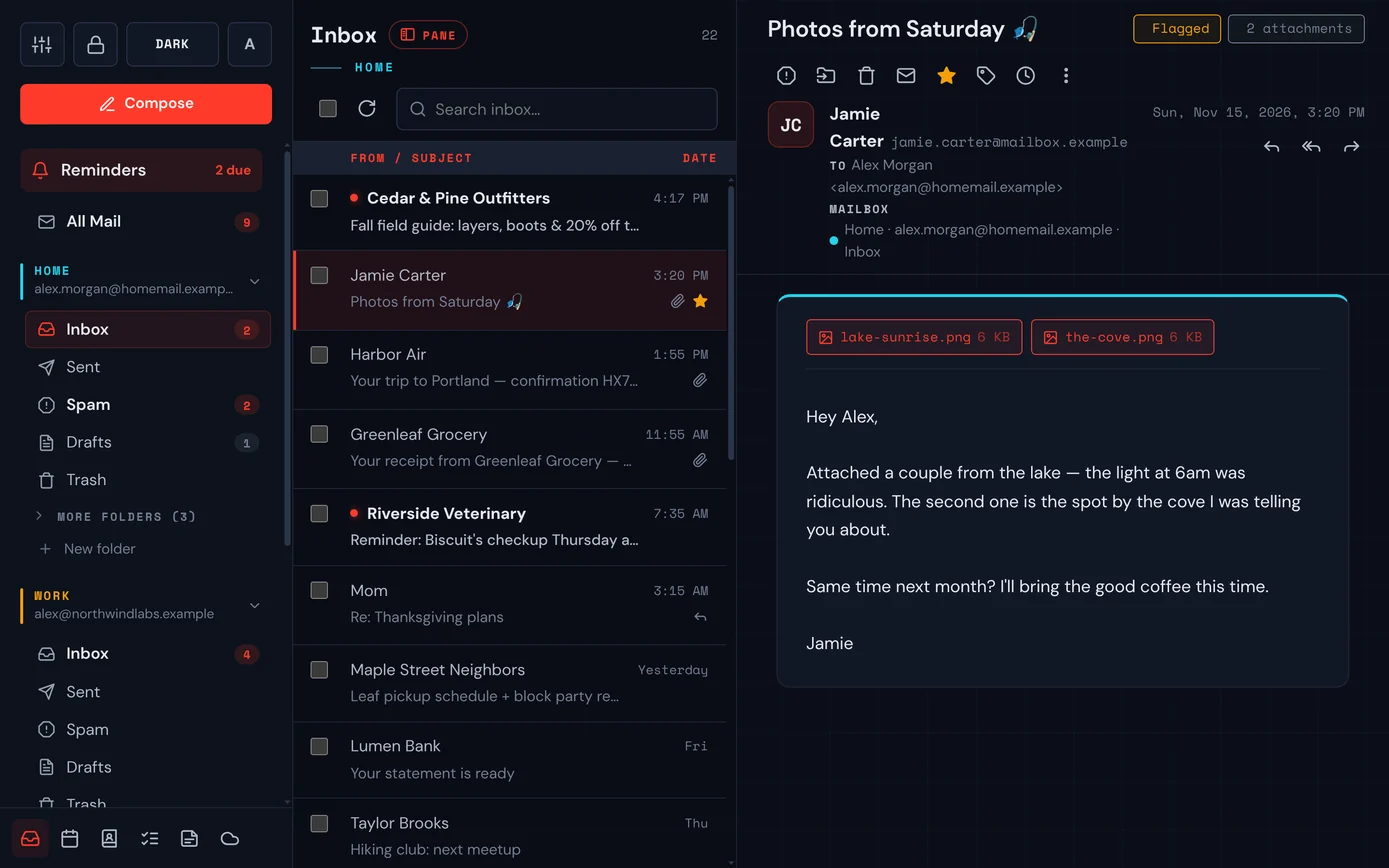
Native apps for Windows, Mac and Linux: fast, small, and the full suite of mail, calendar, tasks, notes and contacts, with reminders that pop up like Outlook's.
Free email app · No ads · No AI · PC, Mac, phone and web
Nothing else comes close.
Free, and easy. Peep is an email app for your PC that does away with webmail. Type your address and Peep fills in the settings for Gmail, Outlook, Yahoo, AOL and iCloud; your internet provider's mail and your own domains work too. All your mailboxes sit in one fast window, with a calendar, contacts, tasks and notes. No ads, no account with us, no tracking, and no AI reading your mail. Want the same mail on your phone and in any browser? Put Peep Web on your own server and link everything to it: it keeps every mailbox connected, runs your rules and sends scheduled mail while your devices are off.
See it in action
Put Peep Web on a server, add your mailboxes, then a tour: one inbox for every account, previews, send later, Peep Drive, the calendar and the desktop apps.
The video plays from YouTube's privacy-enhanced player when you press play; nothing loads from YouTube before that. Watch it on YouTube
How it works
A linked PC never logs in to your mail servers for the mailboxes it pulls from your Peep server. Mailboxes you only set up on the PC keep working on their own.
Mail servers
Gmail, AOL, Yahoo, iCloud, Outlook, Dovecot, anything with IMAP and SMTP.
Peep Web · your server
Holds the passwords, keeps every mailbox open for push mail, runs rules, and serves the browser app.
Peep apps
Keeps the last 90 days on the PC, gets new mail live, and queues your actions while offline.
Pick per mailboxTick the server mailboxes you want on this PC. Untick one later to remove just that mailbox.
One calendar, task list, address book and set of notesShared by the web and every device. Edited in two places while apart, nothing is lost: the newer edit wins and a note's other version is kept beside it.
Sign a PC outLinked PCs show up in the web app under Settings → Devices, where you can unlink them.
Security
Your mail, passwords and keys sit on your server and your devices. Here's how they're protected, and what you're relying on.
You choose how long a browser, PC or phone stays unlocked (every time, a day, a week, two or thirty) and whether it locks when nobody's using it.
Five wrong PINs from one address make it wait 15 minutes, doubling up to a day. Devices already signed in keep working, so nobody can lock you out on purpose.
See each signed-in browser and linked PC, and sign any of them out. Unlinking an app wipes everything it got from your server.
Mailbox passwords are encrypted at rest: AES-256-GCM on the server; Windows DPAPI, the Mac Keychain, your Linux keyring or the Android Keystore on devices.
Each release is run against a set of attack messages (scripts, disguised links, parser tricks, pictures that phone home, giant messages) in a real browser, three ways.
One file sealed with your passphrase. Each release restores one into an empty install and checks everything returns, and that a wrong passphrase or a changed byte gets nothing.
Email anywhere
Work mail has had this for years: what you do at your desk is already done in the browser and on your phone. Peep brings that home, with the same look on every device.
Native apps for Windows, Mac and Linux: fast, small, and the full suite of mail, calendar, tasks, notes and contacts, with reminders that pop up like Outlook's.
Peep Web runs on your own server and opens in any browser, on any computer, with the same layout as the apps.
Peep for Android, iPhone and iPad. Same mailboxes, same folders, same calendar, unlocked with your PIN.
With a Peep server, file a message on your phone and it's filed on your PC and in the browser. Rules run and mail arrives while every device is off.
Gmail, Outlook.com, Yahoo, AOL, iCloud, your ISP or your own domain. Nothing to move, and no account with us.
Peep Enterprise (PeepEn) gives a small business the Exchange feel on the mail it already has: shared mailboxes, shared calendars, rooms, chat and an admin center.
The suite
Most mail apps stop at reading and sending. Peep keeps the things around your mail together with it, and keeps all of it on your side.
Gmail, AOL, Yahoo, iCloud, Outlook and your own domains side by side, with push delivery, server-wide search and mail that looks the way its sender meant.
Month, week, day and agenda views. Answer Outlook and Gmail invites from the message, send your own meetings, and get reminders.
A notepad beside your inbox. Start a note from any message and it links back to it. Deleted notes wait 30 days in the trash.
One address book for every account. Bring yours from Gmail, Outlook, AOL, Yahoo or iCloud, and it fills in your To and Cc as you type.
Sort, flag and mark mail the moment it lands, even with every screen off, because your server does the work.
A to-do list beside the calendar: overdue, today, upcoming and no date. Turn any email into a task, a reminder or a meeting.
Calendar
Meeting invitations show up as a card above the message with Yes, Maybe and No. Your answer goes back to the organizer from the mailbox the invite came to, and the event lands on your calendar.
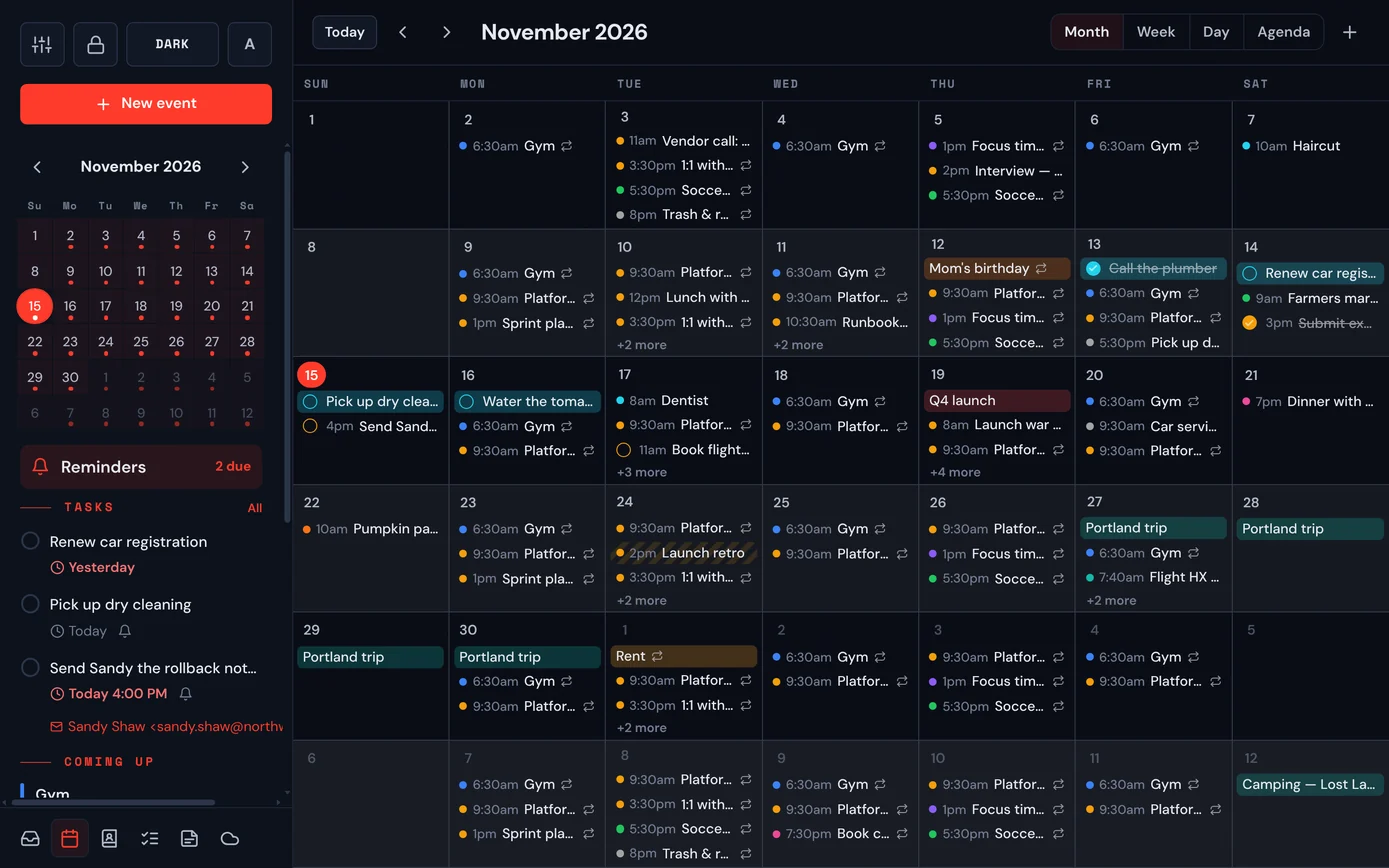
Your own meetingsAdd people and Peep emails them a standard invitation. They get updates when you change the time or place, and a cancellation if you call it off.
RepeatsDaily, weekdays, weekly, monthly and yearly. Change or delete just one occurrence without touching the rest.
Reminders three waysA browser notification, a Windows notification, and an email from your server, which arrives even with every screen off.
Fast to driveClick or drag on empty time to make an event. M, W, D and A switch views, T jumps to today, Shift+C goes back to mail.
Run it your way
Every edition has the same layout, themes and keyboard shortcuts. Pick the one that fits, or use both and link them.
Unzip it on any web host, even cPanel shared hosting, and finish setup in your browser. Use it from any browser, on any computer or phone.
Native apps for people without a web server. They connect to your mail servers directly, or link to yours.
Windows 1.39.136 · Mac 1.39.136 · Linux 1.39.136 · Android 1.39.136
Point the app at your Peep server and pick which mailboxes to pull down.
The details
New mail shows up within seconds. Your server holds one connection per mailbox for everyone, so providers that limit logins, like AOL and Verizon, don't lock you out.
Your Peep server fetches the pictures in your mail, so senders see your server, never your computer or phone.
Your server keeps its own copy of your mail, so search, lists and counts are instant on every provider, full text included.
The desktop app keeps 90 days of mail on the PC and queues what you do until your server is back.
J and K to move, R or Ctrl+R to reply, Ctrl+Enter to send, / to search. Press ? anywhere for the full list.
A PIN on every device, passwords encrypted at rest, scripts stripped from every message, and remote images under your control.
Dark, Classic, Grey, Cream, Sky, Forest and Light. Every message body is shown on a clean white page so newsletters look the way their senders meant.
OpenPGP and S/MIME, with the keys on your own server. Nothing to set up on your computer or phone.
Take back a message in the first seconds, or schedule it. Your server sends it with every device off.
On a new install, Peep checks the server it's on and hands you the exact commands for anything missing, for Rocky, RHEL, Debian or Ubuntu.
Shipped
Everything below is released and in use. Every version is in the changelog with its date, and here's how it's tested.
Shared mailboxes, shared calendars, a company directory, chat, calls and a shared Drive, on top of the mail service a business already pays for. Learn more.
Peep for Mac is on the Mac App Store, or as a download from this site.
Peep for iPhone and iPad is on the App Store, linking to your server the same way Windows, Mac, Linux and Android do.
Windows: unzip and run. Web: unpack on your server and follow six steps. If Peep earns a place on your screen, you can donate.